Why am I reviewing Final Fantasy 13 now? It has taken me this long to get around to finishing it. It has very little in common with previous Final Fantasy games, I can see why they have don’t this but I don’t think it has worked quite as well as they would have liked. Thirteen is said to be an unlucky number, it probably wasn’t the best choice for Square to mixed up the formula quite so much knowing this.
-
+
+
+
+
+
+
+
+
+
+
+
+
+ 13, fantasy, final, final fantasy 13, final fantasy XIII, playstation, playstation 3, ps3, review, XIII+
+
+
+
+
+
+
+
+
+
+
+
-
+
+
+
+
+
+
After finally filling up the standard 60GB hard drive in i decided to change hard drive. Although it didn’t go quite to plan I do have to say it was fairly painless.
-
+
+
+
+
+
+
I received my Pandora a few months ago now. I can say without a shadow of a doubt it is still unique, quirky but somewhat troubled. However we all knew that when we signed up.
Receiving the package and opening it up was a bizarre experience. I can only liken it to seeing a Dragon. Everyone knows what a dragon looks like and what it does but to actually see one and be able to touch it with your hands is quite a unique experience….Ok maybe you wouldn’t want to touch a dragon but I hope you can understand the sentiment.
My Pandora was part of the first main batch but after the first few hundred so I don’t have any of the early problems. The case structure itself feels nice and thick, it doesn’t twist or bend, nor does it have any rough edges. This was much better than I expected and is something you can’t really judge without getting your hands on it. Painting the cases at the last minute has worked well as the surface is uniform in colour and has a nice ever so slightly rubbery texture to it, I definitely feel this was the right thing to do. That said it has had a knock on effect with the shoulder buttons which I will come back to later. The hinge snaps open and shut at the right angles and has a small amount of resistance for the rest of the range, it sits fairly well in a 100 degree laptop style position but it is really designed to be used in the locked open flat position. I do sadly have a problem the battery cover popping off as the latches don’t seem to clip in correctly, this appears to only effect my unit. I will send it back eventually however for the time being I’ve resolved the problem with some highly technical tape.
The keyboard looks extremely good and is very responsive, I don’t think I’ve ever missed a letter. It does have a slightly odd feeling when you push the keys as they are spongy but have a fairly long travel however you soon get used to it, every keyboard is different after all. The D-Pad and face Buttons are generally very good, again they never seem to not respond or misfire. My A button is slightly raised up compared to the rest of the action buttons however it still seems to work normally and I expect will loosen up over time. The shoulder buttons are…interesting thanks to the slight variation of the Pandora team having to drill the holes after the shoulders where painted. The actual button itself is a nice positive feeling switch which is always works, they remind me a lot of the SNES controller shoulders in that they have a soft click to them. The problem is the plastic shoulder button itself with sits over the switch, it is ever so slightly loose from the manual drilling (I believe they aren’t painting the shoulders on the newer ones) . The shoulders are good once you get your fingers lined up on them correctly however it often takes a failed attempt to do it.
The nubs are very good in the GUI , by default the left stick moves the cursor and the right stick does the mouse button clicks and as of Hotfix4 you can also do the middle mouse button by pushing down. It sounds a little odd however it works well once you get used to it. I’ve also used them on some Playstation games and all appears to be working well however I real test would be Quake 3 but the last build I used had controls that weren’t quite there yet. There is a small amount of play in the middle the nub then about 3mm radius of active area, they are definitely 10x better than the nubs used on the PSP and PSPGo. You do also get a nice amount of resistance when you push to the side to let you know you are hitting the limits.
The sockets, volume wheel and card slots are all fixed solidly and don’t feel like they cave in unless you really abuse them, certainly much better than my First Edition GP2X. The volume adjustment is smooth and doesn’t suffer from any crackling, there was a software issue that was causing sound crackles but this does appear to have been cleared up in the newer builds. The speakers are generally nice and loud with fairly good range for a device this size, but there is only so much you can expect from speakers that size.

As far as the design of the unit goes would I change anything? Not really, everything is well laid out. I know the keyboard is an issue for some however as a native English speaker without the need for accents and so on I suits my needs well. Having a touch screen on the top is a little odd to use however given amount of buttons needed there isn’t really much that can be done about that without making it an unwieldy beast. Ascetically I think its quite good looking in a KITT from knight rider kind of way, it looks retro yet modern and reminds me a bit of IBM/Lenovo styling.
I also received the official Pandora carry case which is good quality and lined with lovely white fuzz. It is very tight if you try to push the Pandora in to it however I’ve found the best way is to just put it in upside down in which case it goes in and zips up with no resistance what so ever.
The default Angstrom OS does fairly well to sit somewhere between a full OS and a console. It is clutter free and generally stable, I’ve never had a hang whilst using the OS itself only whilst using 3rd party software. There are some nice additions such as having a built in option to set the processor speed with an amusing disclaimer about blowing it up.
There are two built in GUIs which you can set as default or flip between at will:
XFCE Looks and behaves like a standard X window GUI. There are lots of customisation options such as resizing and moving docks, multiple workspaces, generally if you have used or dabbled with gnome or kde before things should be fairly familiar. You can control the menus with either the touch screen, the nubs which act as a mouse or the D-Pad which acts as cursor keys. Generally it is smooth and a trouble free experience.
MiniMenu is designed to be a bit more like a traditional games console and does away with windows in favour of a few tabs.
Both of these GUIs make use of the .PND format which is the method of distribution used for programs on the Pandora. The general concept is that you download and drop the Example.PND file to certain folders on your SD card. The Pandora then scans those folders for .PNDs and depending which folder you put it in the system gives you a shortcut on your desktop or in your games menu. Whilst I don’t know the technical details of the system I do know as long as developer has added them it will also automatically give you other data such as ReadMe files in your document folder, preview images and meta data such as suggest CPU speeds.
Once you have got your head around the quirks of the system like which folders you need to put the PND files in for them to be picked up the system works well. My major criticism of the format is that like many open source standards it is a bit under standardised. For example the location of application files, ROM and BIOS files isn’t standardised. I do think however that the freedom for developers to do things their way is much more beneficial then having a rigid standard.
OS Upgrades and Re-imaging are nice and easy to do. Place the image on your card in SD slot one then hold the right holder button as you power on the machine.
Charging your Pandora has to be done whilst your Pandora is switched on, if your Pandora is switched off it will switch itself on when you plug in your charging cable. Once fully charge the battery does genuinely seem to last about 10 hours at stock clockspeed. The shelf life of the battery itself is very good and doesn’t seem to loose any charge whilst left switched off.
All in all I’ve been very happy with my Pandora and really admire what the Open Pandora team have done. It is quite clear that the project hasn’t been going according to plan for quite some time which has put strains on the community and expect they all now see why GamePark and GamePark Holdings were so resistant to making any design changes no matter how small. Planning something is easy, executing it isn’t. Along the way they have hit a mountain of problems, some of them they would have excepted by people with more experience however they have had a string of bad luck, they even caused the Icelandic volcano eruptions a few months back!
Lastly I’ve been happy to be part of something niché and special. In an age of instant gratification it has been a good having to wait for something.
+
+
+
+
+
+
+
+
+
+
+
+
+
+
+
+
+
+
-
+
+
+
+
+
+
So the cataclysm is rapidly approaching, before then however we have the 4.0.1 patch which applies all the new system mechanics and class mechanics.
This includes:
New Talent System including Mastery
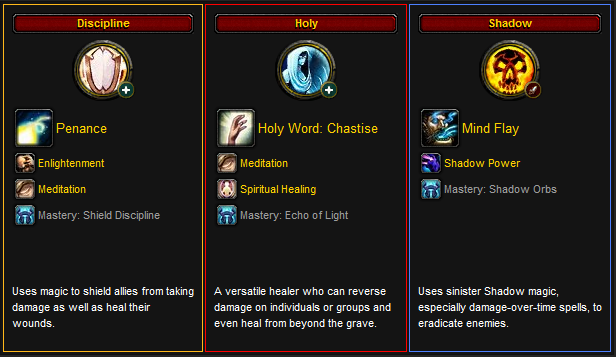
All of the new 31 point talent trees are in along with Specialization and Mastery. So now at level ten when you get your first talent point you get prompted to select the tree you want to specialize in. Once you do this you are locked to that tree until you put 31 talent points in to it, but in return you get a set of abilities and bonuses to make you feel like you are really specialized in that tree. For example, Frost Mages get a 25% increase to their frost spell damage and get the permanent water elemental pet. Discipline Priests get Penance, a 15% increase to intellect and 50% mana regeneration in combat.
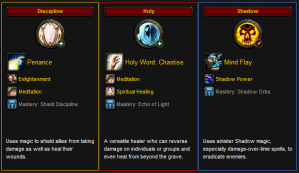
Think of it as a down payment, you put a deposit down and get to instantly reap the benefits. For those at level 80 you will find that when you login after the patch all of your talents will be reset. Once you start respecing you will probably notice that at some points in the tree you hit a roadblock where you have to pick Utility or Survivability talents to continue down the tree. This is intended as it lets you customise your character without gimping your DPS or Healing by choosing sub-par talents. Not all talents trees are as good as each other at achieving this however you should find that at least at one point you will have to choose between something like receiving 6% more healing or increasing the range on a utility spell. For me this really improves the fun of picking talents as it really does give you options, DPS increases talents are not options.
New Character Page
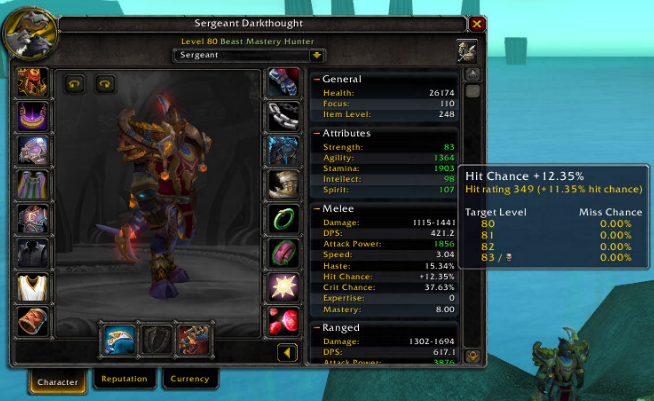
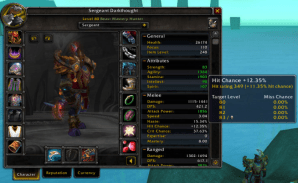 A much needed improvement was needed to the character screen. All the stats now sit on a pop out window and these have been cleared up to make the system a lot more transparent. The stats now tell you directly for example the chance you have of missing enemies and raid bosses so you no longer have to go somewhere like wow heroes to find this information out.
New Spell Book
The spell book interface has been reorganized and been given a general polish. All spells now only have one rank and adjust their power at each level. In addition all spells are visible in your spell book from the beginning for the game, they are initially greyed out but light up when they are available from your trainer.
New Glyph System
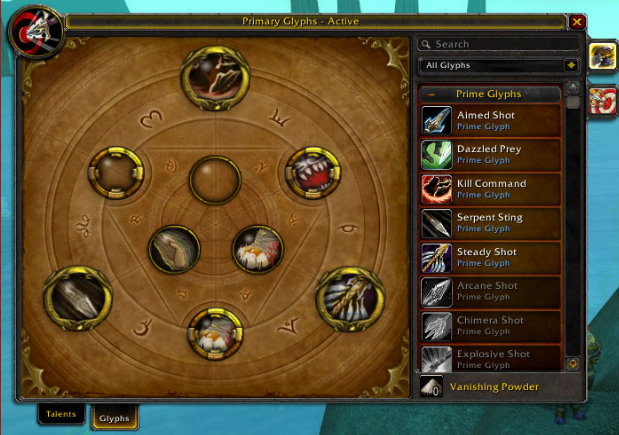
The glyph changes are two fold. Firstly when you buy a glyph and use it you learn it forever. Just like the spell book all
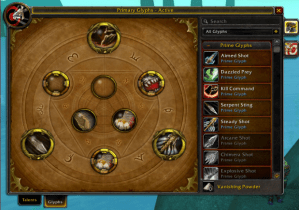 available glyphs are listed but are grayed out unless you have learned them. As you can see all the glyphs that you don’t have i expect many people will feel like they need to complete their set and buy the lesser used glyphs.
The second change is that there are now three types of glyphs. Prime Glyphs directly increases the effect of an ability (fireball does 5% more damage. Major Glyphs change the mechanics in some way (Circle of Healing heals one more person) and Minor Glyphs change cosmetic or trivial things. You get 3 slots of each.
New Guild UI
Continuing the UI changes is the guild UI. In addition to the polish there are added functions such as profession and crafting lists for every character. Although it won’t be active in the 4.01 patch the provisions have been made for the guild XP and leveling system which will hopefully lead back to more people doing runs as guilds rather than individuals. There is now a cap of 600 guild members per guild, which doesn’t seem unreasonable.
New Raid UI
The new raid frames have been updated to be a bit more user friendly. In addition there are new tools including the ability to put smoke signals down in the world to mark areas.
Ability Re-balance
All abilities are now balanced around level 85 which means classes will generally bit a bit imbalanced. Don’t worry too much, if you are a bit underpowered at the moment it should be worked out at 85. Equally there are now specs that were previously completely unviable like Rogue Subtlety and Mage Frost which are now viable.
New Spells and changes to when you get existing ones
The timing at which you get all your spells has completely changed during leveling. Generally you get either a talent point or a new spell every level whilst leveling. This should help eliminate problems with trees such as the Mage’s arcane which currently rely on spells they don’t get until much later in the game. There are additional spells for some classes however these do not include ones gain between 81-85.
Spell and Proc Notifications
There are now two new features to help you with your abilities and procs. Firstly there is now basic built in power aura like on screen graphics to tell you when your big talent procs go off. These work very well, looks great and should be very useful for those that don’t currently use power auras. However they can’t customizable in any way so current power aura users may want to stick with what they already have although it mays still be worth looking at.
Secondly action bar buttons now light up and glow when they are being buffed by something and should be used. For example Beast Mastery hunters have an ability should be used when their pets have 5 stacks of a buff, the button for this ability now lights up when their pet is at 5 stacks.
These two parts combined are wonderful additions, hopefully the button light ups will be incorporated in to bar add-ons such as dominos.
New water and light Effects
The Cataclysm water effects are coming with 4.0.1 and with them so are a few new lighting effects. The water looks extremely good on open areas of water in peticular however it does sometimes have a slightly plasticy look for small pools. There are 4 slider levels for water, the lowest being the current water. In addition to this there are also light effects such as “God Rays” which are produced by things like the sun making shafts of light through the trees.
New points system replacing emblems/badges
The old Emblem of *Inspiring Word* system is now being replaced with a system that is a little more like the current PvP system. All of your current emblems of Triumph and Frost will be converted in to points, any other older badges or tokens will be converted to goldz and posted to you. If you want to buy heirlooms do it today as the price will be going up by a LOT.
Steamlining of Raid Buffs and removal of Reagents
No more Pallypower! ALL class buffs now only have one version rather than separate single target and group version, secondly no reagents are required for them anymore. Some buffs have been consolidated together such as Mark of the Wild and Blessing of Kings. In addition paladin buffs have had an overhaul so there is now only blessing of might (which does the old wisdom effect and attack power) and blessing of kings (% stat increase and spell resistance)
Beginner Tooltips in Plain English
There are new tooltips switched on by default which explain abilities in plain english and tell you when best to use them. These can be turned off by going to Interface->Help->Disable Beginner Tooltips
-
+
+
+
+
+
+
 If you have been unlucky enough to buy or have to install an HP ML115 G5 entry level server I feel your pain. There is a slight issue if you want to use the onboard raid feature with Server 2003, windows setup is going to ask for a floppy with the drivers on, unfortunately the server doesnt have a floppy port. At this point you are going blow the dust off your trust USB floppy drive, but the problem isn’t going to stop there unfortunately.
The raid drivers for ML115 do not include the drivers needed for windows setup to actually read the USB floppy drive correctly. If you try without adding it the windows setup will get about half way before coming to a halt.
Head over to the HP Support Page to get the Raid Driver (Link) , Extract the contents of the folder in the zip on to a freshly formatted floppy. Once you have done that on the root of the floppy you should find a txtsetup.oem , open this in your choice of basic text editor. Add the following lines to to the bottom of the [HardwareIds.scsi.BUSDRV] and [HardwareIds.scsi.RAIDCLASS] sections.
id = “USB\VID_03F0&PID_2001”, “usbstor” #–HPid = “USB\VID_054C&PID_002C”, “usbstor” #–Sonyid = “USB\VID_057B&PID_0001”, “usbstor” #–Y-E Dataid = “USB\VID_0409&PID_0040”, “usbstor” #–NECid = “USB\VID_0424&PID_0FDC”, “usbstor” #–SMSCid = “USB\VID_08BD&PID_1100”, “usbstor” #–Iomegaid = “USB\VID_055D&PID_2020”, “usbstor” #–SamsungAfter that is done, cross your fingers, plug your USB floppy to the ML115 and boot to your Server 2003 CD. Tap F6 when prompted and select BOTH of the following drivers.NVIDIA RAID CLASS DRIVER (required)
NVIDIA nForce Storage Controller (required)
Continue the Server 2003 as normal, Bob’s your fathers brother
-
+
+
+
+
+
+
I’m picking up keys in about an hour, I’m far too calm. Panic starting in 3…2…1
+
+
+
+
+
+
+
+
+
+
+
+
+
+
+
+
+
+
-
+
+
+
+
+
+

Greetings miscellaneous internet person!
I’ve been flowing DeathSpank ever since it was first annouced on Ron Gilbert’s blog GrumpyGamer so needless to say I was very excited when it was finally released. So does it live up to my hopes?The First question you may ask is who or what is DeathSpank? DeathSpank is the protagonist from every RPG and Adventure game you have ever played, all of his life he has been destined to find “The Artifact” , he takes on all manner of tasks ordinary people give him without questioning why and he runs around cleaving everything in to a fine paste.
The gameplay itself sits between a hack and slash dungeon crawler like Torchlight and an old school adventure game. Generally the game is based around fetch quests, killing certain monsters or dialogue trees. Despite this the game for me at least had a good variety of quests to the point were I have completed all of them including all the side quests. DeathSpank also uses a similar hint system to the recently released monkey island special edition in that if you can’t figure out how to do a quest you can get progressively more obvious clues. You do this by using fortune cookies which you periodically pick up through general play and generally each quest has 3 clues however 75% of them you should be able to figure out without needing to use cookies.
The Dialogue and writing in general is top notch although I can understand it won’t be to everyones taste. It is constantly silly and fourth walling breaking, never forgetting to nod to all the clichés it adheres to. The voice acting is well executed, both DeathSpank himself and the non player characters really come alive. Even the shopkeepers and orphans are truely entertaining, I will certainly never think about felt in quite the same way again.
 Combat is simple but I personally never found it boring, you can a equip a different a different weapon to each of your four main action buttons. Whenever you strike an enemy your justice meter fills a little bit. If you alternate your strikes between different weapons you get chain bonuses which give you more justice. When your justice meter is full you can unleash your weapon’s special ability, these include things like chain lightning and spinning whirlwind like attacks. There are also combination attacks later in the game where you can combine two special abilities together but generally i found these a bit too fiddly to pull off given the rapid pace of the combat. The blocking mechanics work surprisingly well, when you activate it you take no damage whilst the shield holds. However if you activate the shield just as a blow is about to hit you get a “Perfect Block” which instantly fills your justice meter, so there certainly is some depth of skill available if you want to explorer it. If you are feeling cowardly (which DeathSpank never does) you can just hold your shield are barge enemies out to way.
The world itself is a well realised mixture of 2D and 3D. The floor rolls round almost as if the world is tight cylinder and most objects are 2D cut outs which gives the game a unique Pop-up book like effect. I have actually had a graphics glitch whilst running around in PluckMuckle where the trees became all garbled, then after about a minute the system froze completely. I couldn’t say if this was the game itself or my PS3 though. Over all the game is visually a treat although it does obviously lean towards a stylised look given with its cartoon visuals and often low resolution textures, however this is never an issue given its subject matter and downloadable nature.
 There is probably around 10 hours worth of content here and not a huge amount of re-playability however due to its budget price I think its still great value. DeathSpank was originally going to be episodic, at one point Ron even made a blog post singing the praises of episodic content and explaining why most of the time it failed (in short most people would prefer to to wait until the discounted complete end package is released before buying it). At some point in the design process I think they did a U turn on this, I would like to see the world of DeathSpank expanded however realistically I don’t see it happening now that Ron has left hothead at the end of his contract for DeathSpank as per their original arrangement. This is one of those situations where the game is best remembered as a standalone Masterpiece.
Masterpiece? Yes I think it is, I haven’t enjoyed a game this much for a long time, to the point where I have finished it 100% I don’t think however that everyone will like it. I would say if you like the look of the game and comedy from the trailers you will love the game, if you don’t then you won’t. Simple
Oh and calling the bad guys Orques? Genius
+
+
+
+
+
+
+
+
+
+
+
+
+
+
+
+
+
+
-
+
+
+
+
+
+
I’m quite forward with my dislike of Apple. The Hardware itself is good…well most of the time anyway. I have a problems with the rest of the customer experience, I don’t like being wrapped in cotton wool. When the time came to get a new phone I decided to get an HTC, I’ve had three HTC handsets in the past for work and found the hardware to be good but the Windows Mobile operating system to be clunky at best. So this time around I chose an Android based Hero. I’ve long been a fan of open source software so I was intrigued to see how open the phone is.
Phone Hardware

The Phone itself is made with nice tactile materials, the white version has a Teflon coating which has kept my hero generally scratch free and has almost a waxy texture to it. The Champagne colour version has a more rubbery texture to it. The handset fits well in to your hand and the button layout is generally good however it could be said that the Search and Back buttons on the phones chin are best positioned for left handers.
The Hero was somewhat of a rarity for HTC in that it actually has a jack socket on the top for headsets however you can also use the mini USB socket in the bottom for USB headsets and both work in exactly the same in terms of quality.
The capacitative touch screen is bright, accurate and has a good depth of colour. As expected it does become rather smeary from the constant fingering however this wipes clean easily. As with most phone screens it does tend to look a little washed out when viewed in direct sunlight but you would be hard pressed to find a phone that doesn’t have this problem.
 The Camera suffers slightly from HTCs normal camera problems in that it generally has quite a poor lens. It does well for general day to day snaps and videos however you wouldn’t want to replace a stand alone camera with it. It doesn’t deal very well with low light levels nor does it have a flash.
The Trackball is well positioned and generally a useful addition. It can be used for general movement and things like moving the cursor when writing messages as often fingers aren’t quite precise enough .
Android

Hero ships out of the factory with Android 1.5 (Cupcake) installed , however you can upgrade it either to a newer official firmware or a customised one. HTC have actually been extremely bad about communicating with their customers about the delays to the offical Android 2.1 (Eclair) update, although it did arrive about 6 months overdue. The original Android Cupcake build isn’t bad however it does get quite stodgy at times, lacked support for things like bluetooth file transfer and wasn’t always compatible with some of the newer applications. Rather than upgrade to the official Android Eclair build I chose to upgrade to a custom one called Chocolate Eclair.
To do this you can download the ROM image itself from
http://forum.xda-developers.com/showthread.php?t=723142and install it by following this extremely straight forward guide
http://forum.xda-developers.com/showthread.php?t=645253Thank you to the creators of those two posts and all those devoloping at XDA-developers.com
On HTC phones the standard Android OS has a few added features which nicely round off the phone for the social networking generation and the phone really comes alive when paired with your Google account.
All your contacts can be synced with your Google Account, they can also be tied to the persons facebook account which live syncing of things like Status updates, Contact pictures and even telephone numbers and addresses if the person has them on their facebook profile. In fact most of your Google account features syncronise with your phone in real time including calendars. This information can then be used by other Applications on the phone.For example I could be on a trip to see my friend Sue , she has her address on her facebook profile (secured to her friends only of course). I don’t know how to get to Sue’s new house however I can open Google Maps on my Hero and use the new Sat Nav feature and just select my destination as Sue and it will workout the best route using the built in GPS whilst pulling in the map information from Google Maps.

The main addition from HTC to the Android OS is Sense UI. This gives you a Home Screen that is 7 screens wide, you can then drop Widgets on to these screens and scroll between the screens by swiping a finger left or right. You have a large amount of freedom to customise these screens to your hearts content. If you download applications from the android market place they may have additional widgets for you to drop on to your desktop. For Example if you download the non-offical BBC news application as well as the full application it also gives you a small ticker bar widget.
Away from your home screens your All Programs list can be set as either a grid or list listed in alphabetical order, there isn’t much customisation here however this can be excused given that you can set links to your favourite applications on the 7 home screens you have.
Following the theme of customisation you can easily import mp3 sound files to the phone to use as ring or message tones, in fact there are also applications for editing and cutting MP3 files directly on the phone. This is one area where Android excels over the iPhone, you have access to tinker about rather than play within the framework Apple allow you.
Conclusion
I’m very happy with my HTC Hero , I do have two complaints about HTC though. The first complaint is the massive amount of time it took for them to release android 2.1 in to the wild, especially the GSM version. The Second complaint is the sear speed at which HTC curn out new Handset Models, since I got my Hero, there has been the Tattoo (slightly lower spec) , Legend (slightly higher spec) , Wildfire (Slightly Higher Spec), Desire (much higher spec) , Nexus One (much higher spec) and soon the Evo (Highest Spec) . So at least 6 Android based phones in just over half a year. This makes Apples business model of a new evolutionary model every year seem slow paced.
So would i recommend the HTC Hero and HTC Android phones in general? Yes greatly so. Would I recommend them to everyone? No, they can be too in depth for many users. You have more flexibility but for many this is too much, they want something that “just works”. Due to this I think they won’t ever be the “iPhone Killer” but that is a good thing in my opinion.
-
+
+
+
+
+
+
Over the years 3D technology has come and gone, usually involving novelty films with objects popping out to scare you. Finally technology has matured enough that 3D is now becoming a viable medium, sadly it isn’t quite standardised yet. At the moment we have 3 completely different methods being waved about in our faces. All 3d viewing on a flat screen works in the same way, you display two images but only let each eye see one image, your brain then does the rest.
This uses shutter glasses to cover alternating eyes, this happens 120 times per second, so you get 60 frames per eye.
This is compatible with a fairly large amount of games as the graphics driver renders the game from two slightly different viewpoints, as a result game developers do not have to have this system in mind while the game is being developed.To use it you have to have the following:
- 120hz Monitor – 22″ is approx £200
- 3D Vision Kit – approx £150
- Modern nVidia Graphics Card – Start from £75 and go up and above £400
- Of course a computer that isn’t a pile of crap
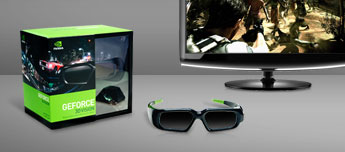
The benefits of this method primarily is that you can play most of your existing games in 3d
Nintendo have done again what they do best, used tried and tested technology and package it together in to a novel format. Make no mistake though, the 3DS will be a massive success. The 3DS uses parallax barrier technology which apart from sounding impressive gives you a 3D image without the need for glasses. Rather than flicking between two images and shutting off one eye the 3DS displays the picture for both eyes at the same time but has an extremely fine barrier in the way that only allows each eye to see alternate lines. Effectively it is like one of those bumpy pictures that change depending on the angle that you look them but a bit more high tech.
The 3DS will probably be around the £150 to £200 region, although it isn’t cheap it will still be the cheapest entry in to 3d for most people.
Finally the PS3 3D is available to anyone with a PS3…as long as you have a 3D TV. It works in a similar way to the nVidia PC solution in that you have a shutter glasses that allow each eye to see alternate frames. With the PS3 the only games that will be supported are ones that are locked at 60 frames per second so that you get 30 frames per eye, any lower than that and you will notice the flickering. At the moment only a few titles such as Wipeout are available however there will be many in future.
Currently the list price for 40″ 3D Ready TV is around £1000 although a projector can be had for around £500 .